Hostaway and QuickBooks

Integrate Hostaway with QuickBooks Online

Double data entry costs you 3–5 minutes on every reservation. With this integration, reservations become invoices and expenses become bills in QuickBooks Online automatically, mapped to the right accounts and classes, so your income and costs live in one place.

Capterra4.84.8 out of 5 starsG24.8Trustpilot4.8
Get started
Hostaway reservations syncing to QuickBooks Online invoices

Cover more financial aspects of your listings in one accounting system

Save time

Reservations and expenses sync to QuickBooks, so there’s no line-by-line manual entry.

Invoices and bills

Invoices and bills are created in QuickBooks automatically, set up the way your business needs.

Advanced reporting

QuickBooks offers budgeting, forecasting, balance sheets, and profit and loss reports.

Built for Property Managers

Add custom line items, choose invoice details, and include extra data (e.g., check-in dates) using custom fields.
Automated invoice and bill generation

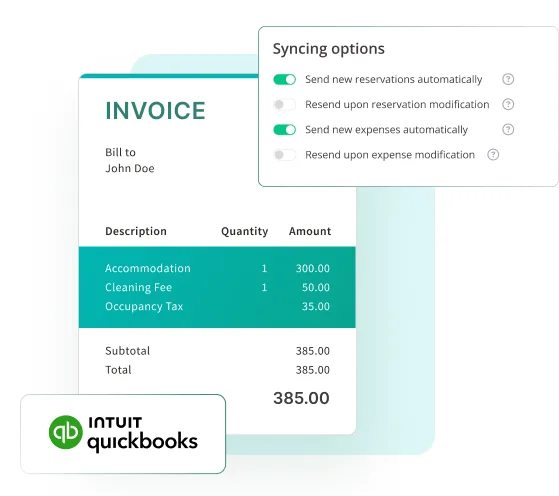
QuickBooks invoice with Hostaway syncing options

Automated invoice and bill generation

Cut manual data entry and errors by automatically generating invoices and bills from Hostaway in QuickBooks Online. Built for property managers, the integration keeps your invoices and bills accurate and set up your way, so you spend less time on bookkeeping and more on your business.

Get started
Sync expenses as bills

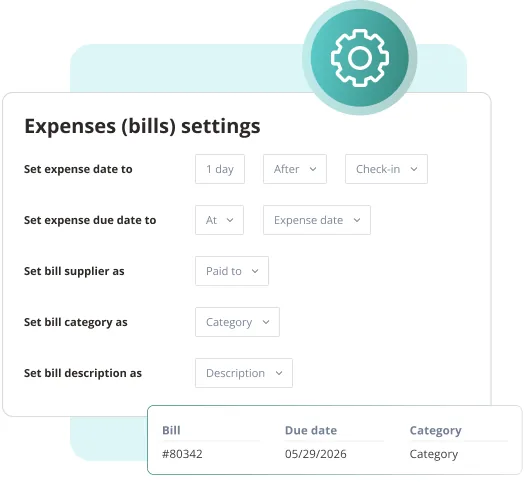
QuickBooks expense bill settings mapped from Hostaway

Sync expenses as bills

Record an expense in Hostaway once, and it shows up in QuickBooks Online as a bill. Each expense goes to the right expense account, and each listing is tagged with its own class, so you can track costs listing by listing. Set bill and due dates around the expense date, check-in or check-out, so cleaning, maintenance and supply costs land in the right period.

Get started
HOSTAWAY + QUICKBOOKS

Ready to save time each week on invoice and bill entry?

Track all your listings and financial data

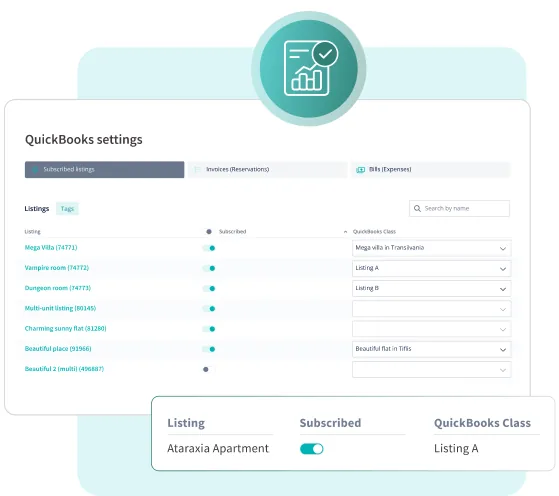
Hostaway listings mapped to QuickBooks classes

Track all your listings and financial data

Achieve accurate financial reporting by mapping your listings to classes, financial fields to services, and expense categories to accounts. With the integration, you can categorize your financial data, keeping your reports up-to-date.

Get started

Send custom information

Custom QuickBooks invoice formulas built in Hostaway

Send custom information

Build custom invoices with our formulas, and add extra data such as channel names or check-in dates so your records reflect how your business runs. For bills, choose which expense fields become the supplier, category and description. Whether you need to break down pricing in a unique way or keep costs organized, your records match your exact needs.

Get started

Awarded, preferred, premier, and proud partner

Hostaway is partnered with all the top OTAs which means you get the most reliable integrations and access to new features first.


Hostaway short-term rental software is a 2025 Airbnb Preferred PartnerHostaway short-term rental software is a 2025 Vrbo Elite Partner with VrboHostaway short-term rental software is a 2025 Premier Partner with Booking.comConnect Google Vacation Rentals with Hostaway for free with our short-term rental softwareHostaway short-term rental software has a seamless integration connection with ExpediaHostaway short-term rental software connects seamlessly with Marriott Homes & Villas through an advanced API

Hostaway helps you scale your business without limits

24

hours of work saved per week

60

minutes saved per reservation

400%

growth with Hostaway

Why professional managers switch to Hostaway

Trusted by 10,000+ property managers

Tens of thousands of property managers on the platform, informing best practices and benchmarks

Hostaway customers

Highest‑status OTA connections

Airbnb, Vrbo, Booking.com, Google, and more — built to eliminate double bookings and keep listings accurate

OTA connection badges

Award‑winning 24/7 phone support

24/7 phone support with a reputation for fast, human help

Hostaway support team member

Top‑rated on Capterra, G2, and Trustpilot

The best‑reviewed PMS experience across third‑party sites like Capterra, G2, and Trustpilot

Review site ratings

FAQs

Begin by getting acquainted with QuickBooks Online. It's a powerful tool, and understanding its capabilities will help you make the most of our integration. Once you're familiar with QuickBooks, you can explore how Hostaway’s QuickBooks Online integration can support your property management financial process.

Setting up the integration is straightforward. Detailed instructions and support are available here to guide you through the process.

The integration is compatible with most versions of QuickBooks Online. Users on the Basic plan won't have the class feature, and they may miss out on additional functionalities. We recommend the Plus and Advanced plans to get the most value from the integration.

New listing subscriptions are priced at $4 per listing.

Yes, the integration is designed to automate data entry processes, from generating invoices to updating reservation data, significantly reducing the risk of errors and saving you time.

Currently, our integration does not support multi-account or multi-company setups.

In Financial Reporting → QuickBooks

Yes, you can disconnect the integration at any time without losing your existing data in QuickBooks Online.

Ready to find out how Hostaway can transform your business?