Automating your VRBO Listing | Top Tips for VRBO Automation


Running a vacation rental sounds like a dream — until you’re buried in guest messages, scrambling to answer late-night reservation inquiries and sending the same arrival details over and over again.
Managing guest communication manually works when you have one listing and plenty of time. But as your vacation rental business grows, so do the tasks — and so does the stress — turning what started as a side hustle into a full-time job.
Vrbo guests expect fast replies, clear directions and a smooth experience from booking to check-out. And if you’re managing multiple properties or listing on additional booking channels, trying to keep up without automation is a fast track to burnout.
This blog breaks down why automation is a must, the steps to automate your Vrbo messaging and the easiest ways to make your guest experience smoother (and your life easier).
Why Should You Automate?
Automation takes care of the repetitive stuff — guest communication, booking confirmations, arrival details and review follow-ups — so you don’t have to.
By automating your Vrbo messages, you can:
Reply instantly to booking requests and guest inquiries
Send scheduled messages at key points in the guest journey
Eliminate manual errors and save hours on routine tasks
Maintain consistent, professional communication across the board
Increase your chances of 5-star reviews by keeping Vrbo guests informed and happy
Simply put, automation lets you work smarter, not harder.
How to Set Up Automated Messages on Vrbo

VRBO offers basic automated messaging functionality that can help with day-to-day communication. Here’s how to set it up:
Log into the Vrbo app or website
Go to your Inbox, then click Templates
Hit Create Template and write your message — this could be a welcome message, arrival details or a review request
Assign a trigger, like “3 days before check-in” or “after booking is confirmed”
Save and activate the message
Once set, VRBO sends the message automatically based on the relevant dates you choose.
This works great for basic needs, but for more advanced automation like multi-channel messaging, dynamic templates or managing multiple VRBO properties — you’ll want to invest in vacation rental management software.
5 Easy Ways to Automate and Optimize Your Vrbo Listing
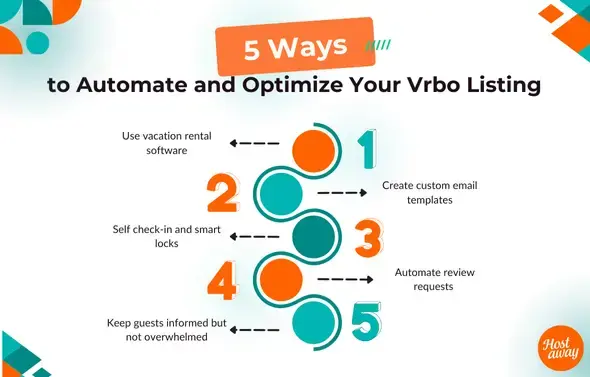
1. Use vacation rental software
Vacation rental software like Hostaway lets you manage everything from one dashboard — Vrbo, Airbnb and other platforms. With it, you get:
A unified inbox for managing guest communication across different channels
A fully automated messaging system that handles booking requests, follow-ups and check-ins
Tools to assign tasks like cleaning or maintenance after each check out
The ability to categorize templates based on purpose (e.g. non available template, booking confirmation, arrival details, feedback request)
It’s an all-in-one tool that saves time, reduces stress and keeps everything organized.
2. Create custom email templates
Don’t rely on cookie-cutter messages. Create custom email templates for each stage of the guest journey:
Booking confirmation with details guests need — property ID, arrival dates, contact info
Check-in instructions sent a day before arrival, including phone numbers and smart lock codes
A welcome guide with house rules, tips and local recommendations
A feedback request after check-out
Use HTML code for clean formatting and to add your host branding. You can also add attachments like a welcome letter or directions. These templates can be reused, saving you time while maintaining consistency.
3. Self check-in and smart locks
Guests expect flexibility and you probably don’t want to meet every guest at the door. Set up smart locks and automate check-in instructions to give guests full control over their arrival.
Use scheduled messages to send access codes automatically. After check-out, make sure those codes are automatically removed to keep your property secure.
It’s a simple way to improve the guest experience while cutting out last-minute stress for you.
4. Automate review requests
Getting reviews is key but most guests won’t leave one unless you ask. Set up an automated message that goes out the day after check-out with a polite reminder.
Make it personal, short and genuine. Let them know you appreciate their stay and how much their feedback helps. This kind of automation encourages more 5-star reviews and gives your listing more visibility.
5. Keep guests informed but not overwhelmed
It’s all about timing. The goal isn’t to blast your guests with information. Instead, automate communications that are short, relevant and spaced out:
A confirmation right after booking
Check-in reminders a few days before arrival
House rules and welcome message the day of arrival
Feedback request after check-out
Send only what’s needed when it’s needed. Avoid unnecessary information and focus on the important aspects of their stay. That way, your guests stay informed without getting overwhelmed.
Why Automation Isn't Optional Anymore

The vacation rental business is more competitive than ever. Vrbo guests expect quick replies, seamless arrivals and clear information. Without automation, it’s nearly impossible to meet these expectations, especially if you’re managing multiple Vrbo properties or listing on additional sites.
A fully automated messaging system means:
You respond immediately to inquiries
You never miss a guest’s request
You reduce errors in mediated communication
You save hours on routine tasks
You create a more professional and polished guest experience
If you're not using automation yet, you're falling behind on what modern Vrbo guests expect from their hosts.
Final Word
If you're serious about your vacation rental business, it's time to automate.
Using tools like vacation rental management software, personalized message templates and automated messaging functionality, you can deliver a better guest experience while taking the pressure off yourself.
So go ahead — set up your fully automated system, categorize your templates and let technology do the heavy lifting. Your future and potential guests, and your sanity will thank you.
Ready to find out how Hostaway can transform your business?





Validated PCI DSS v4.0.1 Level 1 Service Provider.


